
When you are planning to write Tests for an API, make sure to write it in a way where the dynamic variables are used wherever possible, because this will help you to cover new scenarios for every run.


If you are executing a UI test case, for every run you want to test with dynamic or variety of values. Why?? Because you need to try breaking the application and find the hidden bugs. Sending a hardcoded number and directly writing the assertions to match the same with the API response is quite not a good test case I would say.
A good test case should always have less maintenance and more efficiency. I would like to explain an example here with a SOAP request, which details the steps and thought process which will help you to write smart tests using Postman. Yayyy!!
Why wait, let’s start.
For illustration purposes, am using the pubic SOAP API’s: https://documenter.getpostman.com/view/8854915/Szf26WHn?version=latest
Under the folder “Numbers”, navigate to the request “NumberToDollars”.So here, the input number is getting converted into words.
Step 1: Try to use dynamic variables instead of hardcoding the input.


So I am using the dynamic variables which Postman offer by using {{$randomInt}}.
Instead of using it directly inside the body, try assigning it to a variable (scope as per the preference) , by adding the below snippet to the “Pre-request Script” tab:
pm.environment.set(“int”, pm.variables.replaceIn(‘{{$randomInt}}’));
Step 2: Create a function to handle the conversion of the integer into words.
Here I am using some existing function code snippets, feel free to create your own functions based on the action performed by the API to get the end result, because you know exactly what your API does!
function humanize(num){var ones = ['', 'one', 'two', 'three', 'four', 'five', 'six', 'seven', 'eight', 'nine','ten', 'eleven', 'twelve', 'thirteen', 'fourteen', 'fifteen', 'sixteen','seventeen', 'eighteen', 'nineteen'];var tens = ['', '', 'twenty', 'thirty', 'forty', 'fifty', 'sixty', 'seventy', 'eighty','ninety'];var numString = num.toString();if (num < 0) throw new Error('Negative numbers are not supported.');if (num === 0) return 'zero';//the case of 1 - 20if (num < 20) {return ones[num];}if (numString.length === 2) {return tens[numString[0]] + ' ' + ones[numString[1]];}//100 and moreif (numString.length == 3) {if (numString[1] === '0' && numString[2] === '0')return ones[numString[0]] + ' hundred';elsereturn ones[numString[0]] + ' hundred and ' + humanize(+(numString[1] + numString[2]));}if (numString.length === 4) {var end = +(numString[1] + numString[2] + numString[3]);if (end === 0) return ones[numString[0]] + ' thousand';if (end < 100) return ones[numString[0]] + ' thousand and ' + humanize(end);return ones[numString[0]] + ' thousand ' + humanize(end);}}
Step 3: The Dynamic variable can be passed as argument to the function we created.
console.log(humanize(pm.environment.get(“int”)));
We can see the value generated by this function. Since this is SOAP request below snippet also needs to be part of the code under Tests tab:
var jsonObject = xml2Json(responseBody); console.log(jsonObject);
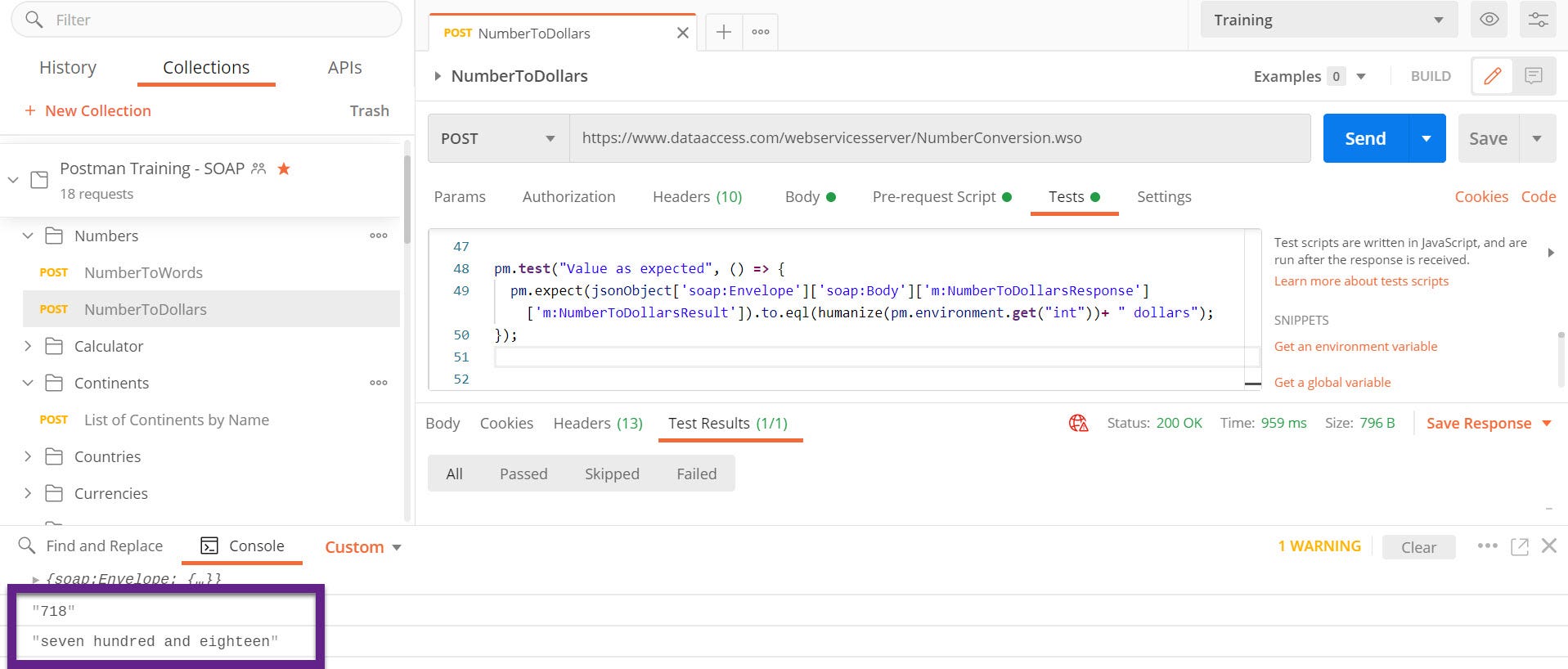
Step 4: Now we can write the Tests to check the actual value in the API response against the converted random variable using the created function for converting the number into words.
Here along with the conversion, the text “dollars” is getting appended to the last, so make sure to add that to the result which is generated from our function.
pm.test("Value as expected", () => {pm.expect(jsonObject['soap:Envelope']['soap:Body']['m:NumberToDollarsResponse']['m:NumberToDollarsResult']).to.eql(humanize(pm.environment.get("int"))+ " dollars");});
After clicking “Send”,
Run 1:
Run 2:

Same approach is applicable for REST API’s as well.. This is just an example.
I hope you got the crux of this story. Make sure to use dynamic variables and try to avoid the hardcoding in the Tests whenever possible 🙂 Create your own functions, for repetitive tasks!! No harm in re-using the existing code snippets if it matches your requirement 🙂
 The Journal of a Tester: Blog about my survival escapades 🚀