
Yes, Postman is used by millions of users due to its usability and features.

But different people use Postman for different purposes and with different tools. For that purpose Postman as such have few API’s to help users in different contexts. I am writing this post inspired by a question from the Postman Community Forum. No wait, let see the capabilities of the Postman API.
To start with, you need to navigate to the public workspace and from there you need to fork the Postman Man API and start using.
As a pre-requisite here you would need a Postman account of course and a valid API-Key.
Steps:
1. Login to your Postman account.
2. Click the Profile Picture of yours.
3. Select “Account Settings”.
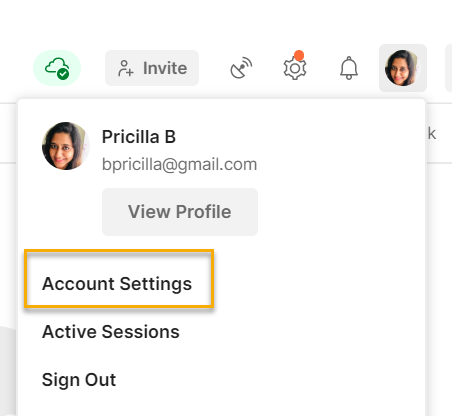
4. Now the webpage is launched and navigate to “Postman API Keys” section.

5. Generate the new API key here, by providing the Name of your choice.

Now the set-up is completed. We have the API key, so we can now fork the collection from the Public workspace.
Steps:
1. Launch this URL.
2. Now the click the three dots to the Postman API.

3. Provide the fork name and select you workspace where you need it.


So what next??
What does this API does? You might have been using Postman for quite long period with different workspaces, number of collections created with many environments…
Right?
Just by single click, you can get all the details here, and the collection is self explanatory with the different endpoints.
These are different folders under the collection.

As the name suggests each folder is related to specific entities.
1. Collections:

You can either view single collection or all the collections in the Workspaces. Also you can create, update and delete collections via these requests.
2. Environments:

Here you can get the environment details using these requests.
3. Mocks:

You can do all activities related to Mock servers using these requests.
4. Monitors:

You can perform all the Monitor related activities using these requests.
5. Workspaces:

You can create/update and delete workspaces using this API requests.
6. Then we have few others like Users, Import and API

It sound’s cool right!! Indeed it is…
So now getting to know the uses, you can use these requests/API/collection in combination with our existing API/collection based on our needs.
For example, in a case if you need to retrieve all the collection variables in-between your execution, you can just call the specific request amongst the existing ones. And many more, it depends on your project requirements!!
Open the “Single Collection” request under Collections folder. You just need to provide the collection UID, and hit enter.

From version 8, you can get the UID’s from here.

And many more, it depends on your project requirements!! You can play around this to get to know more 🙂
In the response the variables of the specific collection is listed.
I hope this is useful to you, please comment your feedback or suggestions!!
 The Journal of a Tester: Blog about my survival escapades 🚀