
Hello everyone,
So far we learned about the basics of API, how to build an API request, Examples of REST and SOAP API, and how to do a JSON schema validation for your responses. Other than schema validation, we have to check some more attributes from the API response. So how do we do that? That’s where we need to create assertions, which are nothing but similar to the front-end test cases.
For any application, we will be drafting a list of scenarios/test cases to be validated right? Same way for APIs we need to add a few assertions as part of the scripting.

What are assertions?
Assertions are the validations done to the HTTP response received back from the server. So every time when you receive the response there are a few things to validate as part of the API Tests.
For example, for any API the response code is one of the basic attributes to be validated right. We will add an assertion to check if the specific API response code is always as expected. If any response code other than the expected one is treated as a failed test case.
Well, you might now have a question about what should be covered as assertions for your API.
This is a million-dollar question. Because we have a few generic validations like Status code, Response Time, Response Headers, Cookies, etc. Other than this the assertions vary from API to API, based on the response values, project requirements, API design, etc.
So here we will consider a public REST API endpoint: https://vpic.nhtsa.dot.gov/api/vehicles/getallmanufacturers?format=json
In this JSON response, we will try to cover the possible assertions.
Learning about the assertions, we have two places in Postman where we write the customized code snippets in JavaScript.
For any steps/validations to be done before hitting the server will be covered in the “Pre-request” Script section.
Any validation/actions to be performed in the response will be covered under the “Tests” section. So our assertion code snippets will be written in the “Tests” section.
One of my favorite sections in Postman is the ready-made code snippets available in the left tab. Once you click the “Tests” section, it will guide you on the list of snippets available.

So even if you miss the syntax, you can select the related one from here and edit based on your API response. After adding the assertions once you send the request every time the added assertions are validated and the results are displayed under the “Test Results” tab in the Response window. Since Postman is having an inbuild Chai Assertion Library. You can visit this site to know more about chai. The best thing here is, the assertions will be in a user-friendly readable manner. Anyone can understand it very easily.

So we will start adding the basic assertions.
Example 1: Checking the Response Code
Select the below snippet from the listed options.
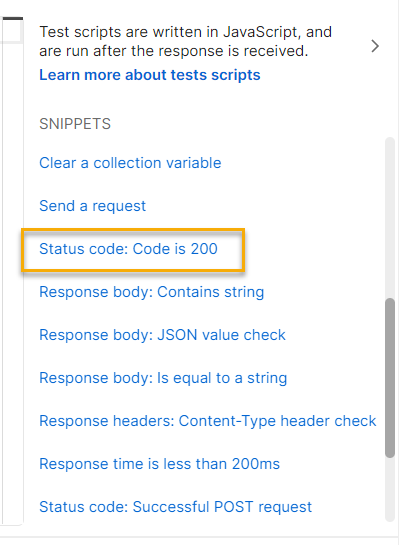
pm.test("Status code is 200", function () { pm.response.to.have.status(200); });This snippet is now placed inside “Tests”. Now if you hit “Send”, your test case will either pass or fail based on the response code.
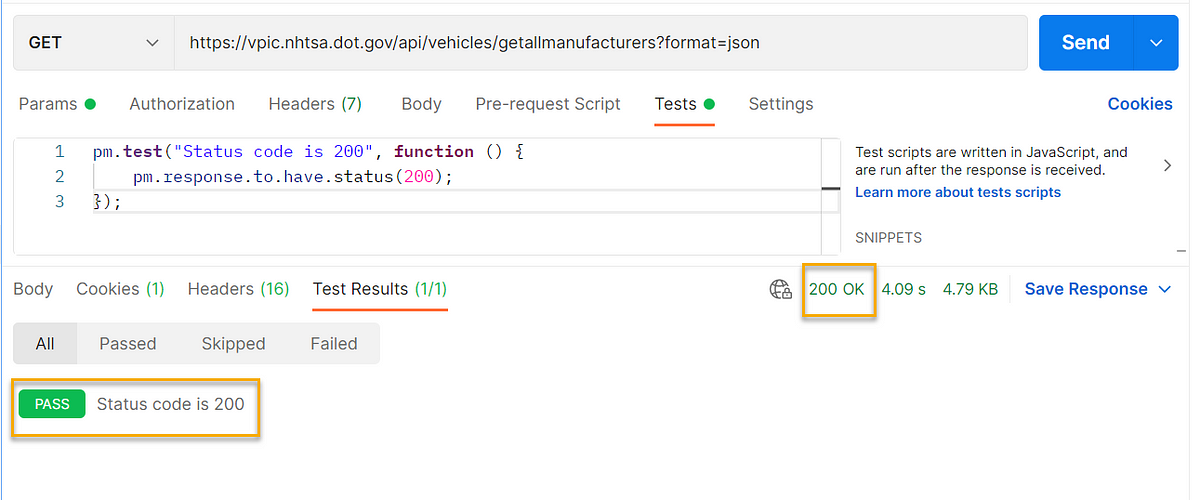
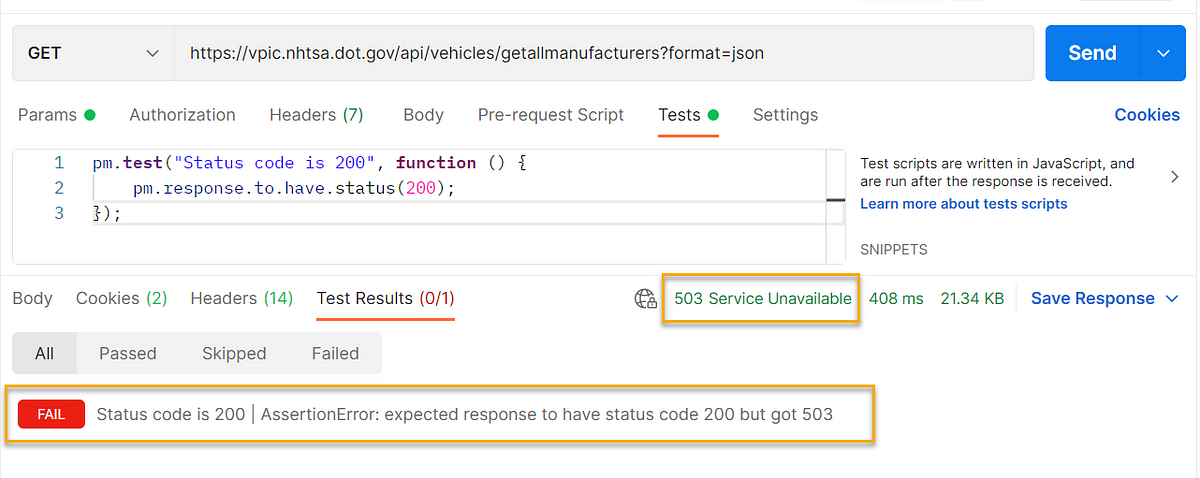
Additionally, you can validate the response code message as well.
pm.test("Status code is 200 OK", function () { pm.response.to.have.status(200); pm.response.to.have.status('OK'); });If you are expecting more than one response code and if that means success, then you can edit the snippet as below:
pm.test("Successful POST request", function () { pm.expect(pm.response.code).to.be.oneOf([200,201,202]); });Example 2: Checking the response time
Select the below snippet from the listed options.
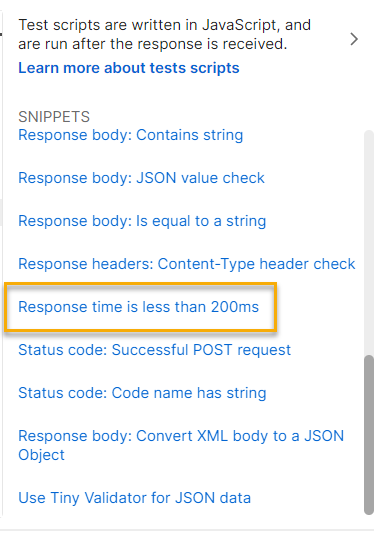
pm.test("Response time is less than 200ms", function () { pm.expect(pm.response.responseTime).to.be.below(200); });This snippet is now placed inside “Tests”. But you can modify the response time based on your API design/documentation. If your API should have a response time between 2000 to 3000 milliseconds then you can edit the generalized as below:
pm.test("Response time validation", function () { pm.expect(pm.response.responseTime).to.be.below(3000); pm.expect(pm.response.responseTime).to.be.above(2000); });Based on the actuals, the Test case might pass/fail.
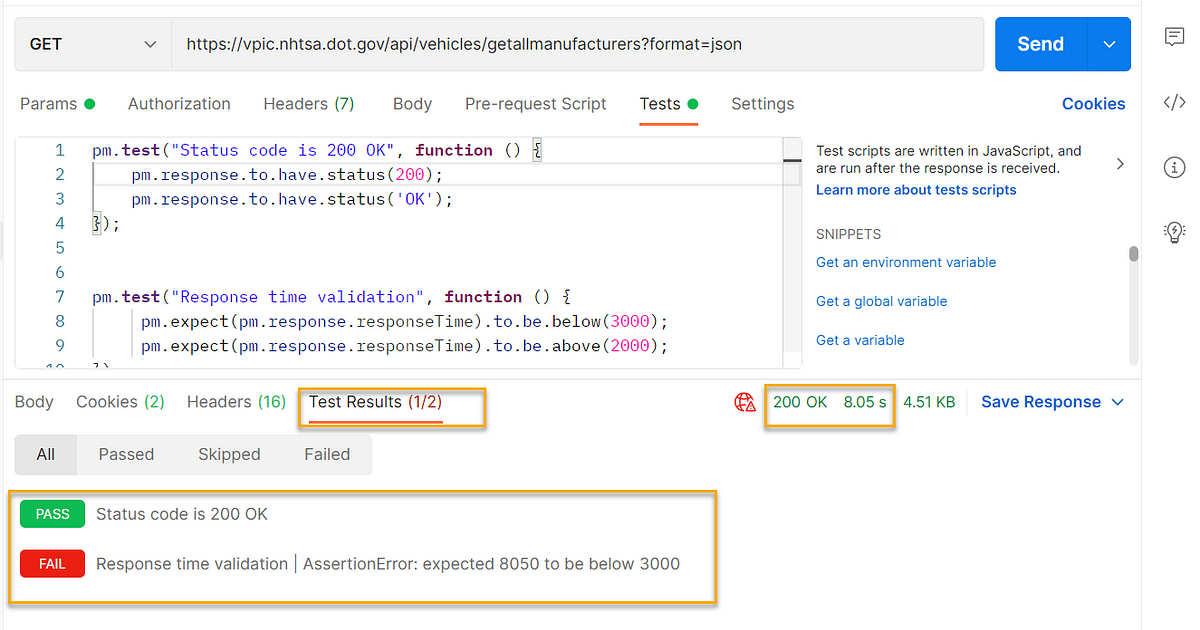
Example 3: Checking the response headers
Select the below snippet from the listed options.
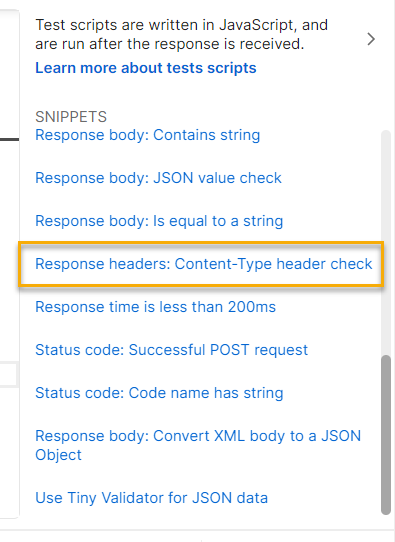
pm.test("Content-Type is present", function () { pm.response.to.have.header("Content-Type"); });This snippet will verify if the header “Content-Type” is present in the response, if you are expecting any specific value as part of “Content-Type” you can tweak your script.

This test case is passing because the response had the “Content-Type” header.
Example 4: Response body validation
When we need to add assertions as part of the response, we should parse the response and store it in a variable as a JSON object. We discussed this in our earlier post. Please check here and brush up if needed.
For better assertions in our response, we will add the below variables:
var resp = pm.response.json();
var names = pm.response.json().Results;
var count = pm.response.json().Count;
As we are aware Postman is using inbuild chai assertions, we can write out test cases based on that.
Based on the requirements/sample API response/API documentation we need to add different assertions. Here, based on our public API response, we can write few possible assertions to validate the response.
To validate the count we can have different set of validations. To check if the count field in the response is matching the count of the array “names” we can use the below snippet.
//to check the length
pm.test("count vs length", function () {      pm.expect(names).to.have.length(count);
});
In the same way, the assertions can be extended based on the response body values.
For some more examples and details please refer here.
These are a few assertions that can be added as part of your test cases, to perform exhaustive testing you need to understand the business requirements and purpose of your APIs. Please explore and try to add different assertions to become a master in writing API test cases.
See you soon!
— — — — — — — — — — — — — — — — — — — — — — — — — — — — — — — — — — — –
Originally posted in https://synapse-qa.com/2021/08/28/apis-unleashed-06-assertions/
 The Journal of a Tester: Blog about my survival escapades 🚀